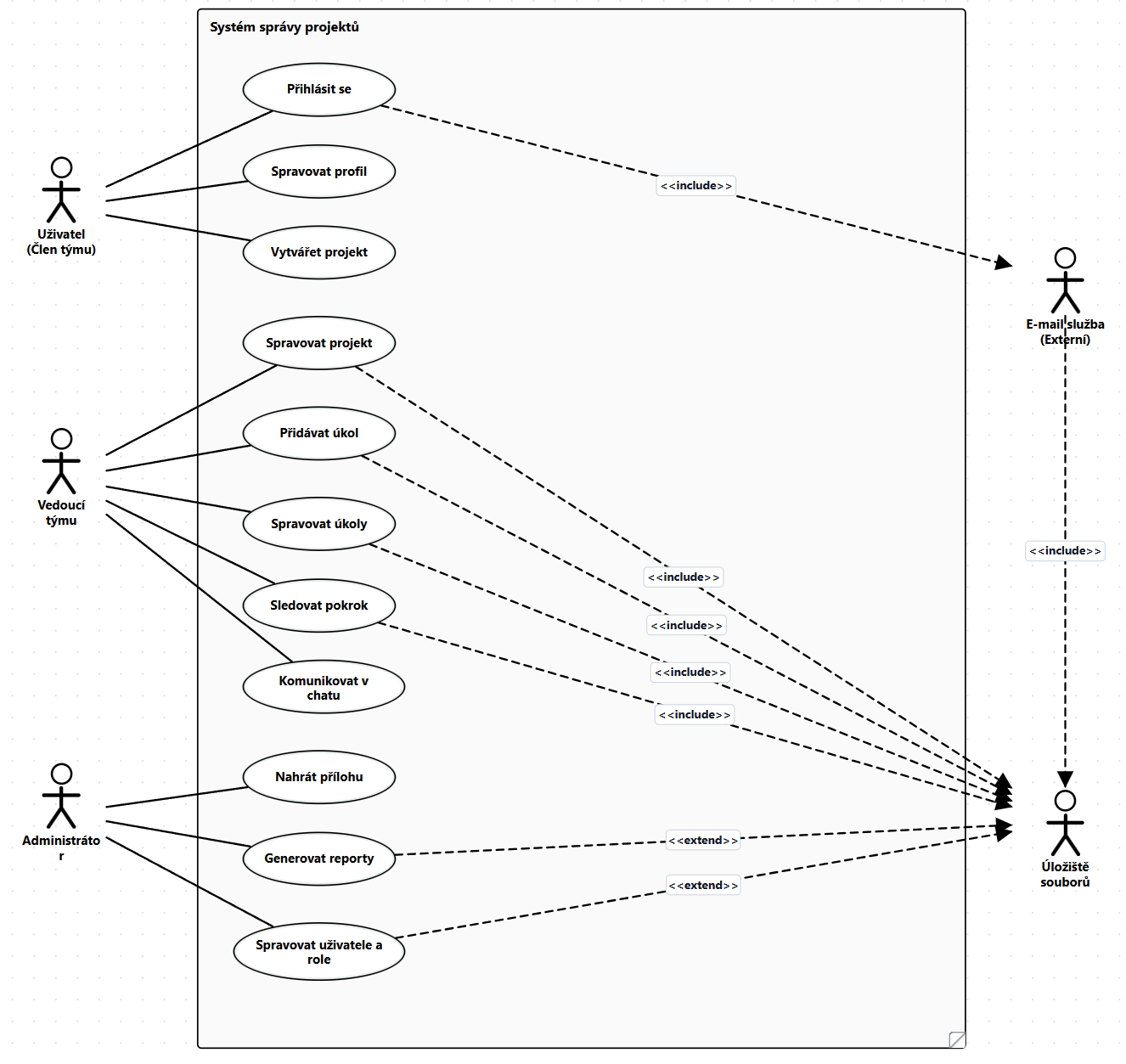
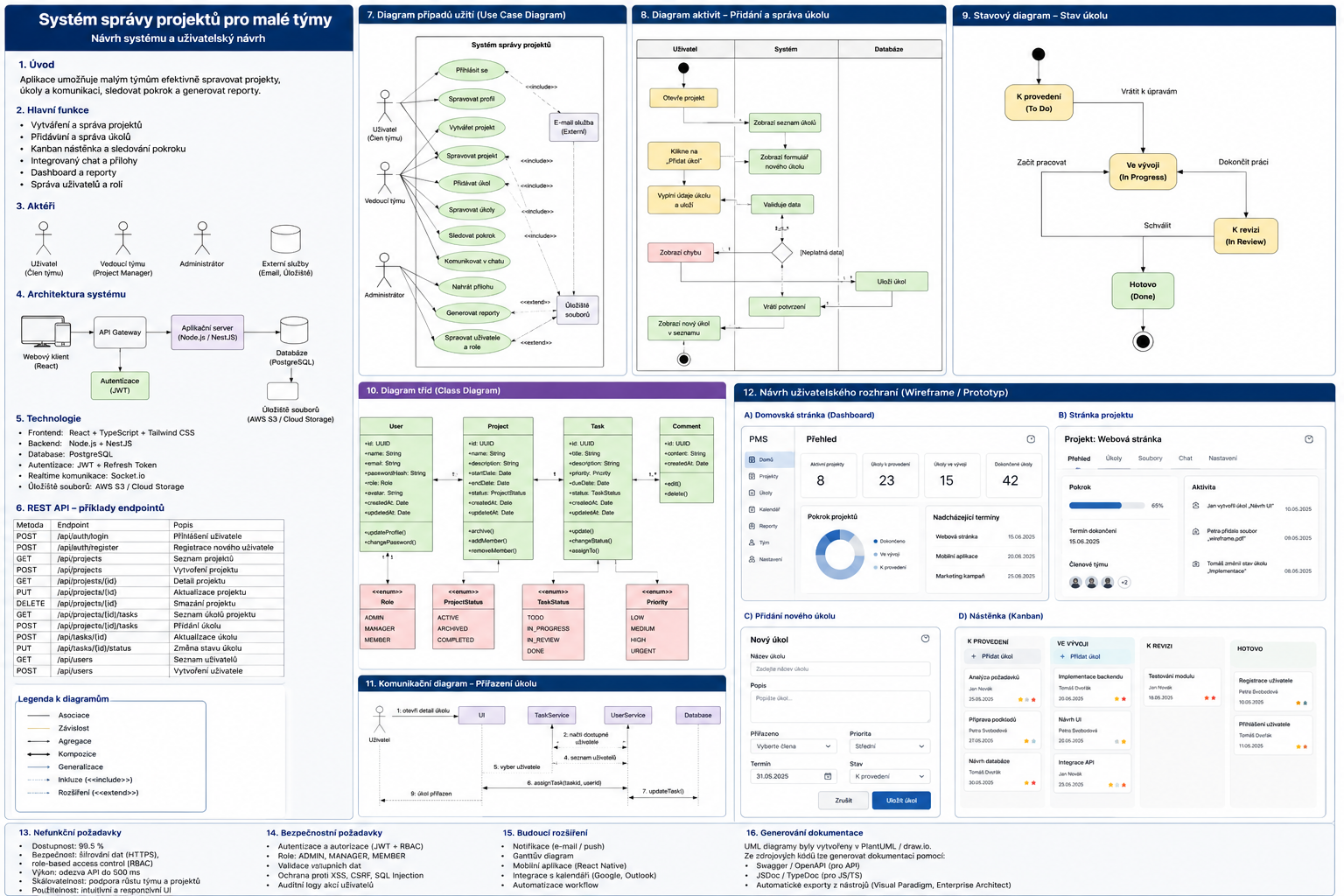
SZZ materiály
Objektově orientovaný návrh
- https://www.drawio.com/blog/uml-overview
- https://usecase.ondrejsvorc.cz/
- https://refactoring.guru/design-patterns/factory-method
- https://refactoring.guru/design-patterns/abstract-factory
- https://refactoring.guru/design-patterns/builder
- https://refactoring.guru/design-patterns/prototype
- https://refactoring.guru/design-patterns/singleton
- https://refactoring.guru/design-patterns/adapter
- https://refactoring.guru/design-patterns/bridge
- https://refactoring.guru/design-patterns/composite
- https://refactoring.guru/design-patterns/decorator
- https://refactoring.guru/design-patterns/facade
- https://refactoring.guru/design-patterns/flyweight
- https://refactoring.guru/design-patterns/proxy
- https://refactoring.guru/design-patterns/chain-of-responsibility
- https://refactoring.guru/design-patterns/command
- https://refactoring.guru/design-patterns/iterator
- https://refactoring.guru/design-patterns/mediator
- https://refactoring.guru/design-patterns/memento
- https://refactoring.guru/design-patterns/observer
- https://refactoring.guru/design-patterns/state
- https://refactoring.guru/design-patterns/strategy
- https://refactoring.guru/design-patterns/template-method
- https://refactoring.guru/design-patterns/visitor
Factory Method
- creational pattern (vytváření objektů)
- definuje metodu pro vytváření objektů v nadtřídě, ale podtřídy rozhodují, jaký konkrétní objekt se vytvoří
- místo přímého volání
newse volá tovární metoda, kterou podtřídy přepisují (polymorfismus) - všechny produkty musí implementovat společné rozhraní
- klientský kód pracuje pouze s rozhraním, nezná konkrétní třídy
- výhody: odstraňuje těsnou vazbu mezi tvůrcem a produkty, dodržuje Open/Closed Principle (nový produkt = nová podtřída, bez změny existujícího kódu)
- nevýhody: více podtříd = složitější kód
Factory Method se vyplatí použít, když v době psaní kódu nevíš, s jakým konkrétním typem objektu budeš pracovat – třeba parsování různých formátů (JSON, XML, CSV), napojení na různé platební brány, notifikace přes různé kanály (e-mail, SMS, push), nebo generování dokumentů v různých formátech. Kdykoli máš společné rozhraní a konkrétní implementaci volíš až za běhu podle konfigurace, vstupu uživatele nebo prostředí, je Factory Method čistý způsob, jak se vyhnout rostoucím if/switch blokům a umožnit přidání nového typu bez zásahu do existujícího kódu.
public interface ITransport
{
    string Deliver();
}

public class Truck : ITransport
{
    public string Deliver() => "Dodávka po silnici kamionem.";
}

public class Ship : ITransport
{
    public string Deliver() => "Dodávka po moři lodí.";
}

public abstract class Logistics
{
    public abstract ITransport CreateTransport();

    public string PlanDelivery()
    {
        ITransport transport = CreateTransport();
        return transport.Deliver();
    }
}

public class RoadLogistics : Logistics
{
    public override ITransport CreateTransport() => new Truck();
}

public class SeaLogistics : Logistics
{
    public override ITransport CreateTransport() => new Ship();
}

Logistics logistics = new SeaLogistics();
Console.WriteLine(logistics.PlanDelivery());
Abstract Factory
- creational pattern (vytváření objektů)
- vytváří rodiny příbuzných objektů bez specifikace jejich konkrétních tříd
- oproti Factory Method (jedna tovární metoda = jeden produkt) má Abstract Factory více továrních metod = více produktů, které k sobě musí pasovat
- rozhraní továrny deklaruje metody pro vytvoření každého produktu z rodiny
- konkrétní továrna vyrábí pouze jednu variantu celé rodiny (garantuje kompatibilitu produktů mezi sebou)
- výhody: produkty z jedné továrny jsou vždy kompatibilní, dodržuje Open/Closed Principle (nová varianta = nová továrna)
- nevýhody: hodně rozhraní a tříd, přidání nového typu produktu do rodiny vyžaduje změnu všech továren
Abstract Factory se vyplatí, když potřebuješ vytvářet skupiny objektů, které musí být konzistentní – třeba UI komponenty pro různé platformy (Windows/Mac/Linux tlačítka, checkboxy, dialogy), databázové konektory s příslušnými command a reader objekty, nebo herní prostředí s odpovídajícími nepřáteli, zbraněmi a terénem. Kdykoli máš více produktů, které musí k sobě stylově/logicky pasovat a nesmíš je míchat, je Abstract Factory správná volba.
public interface IButton
{
    string Render();
}

public interface ICheckbox
{
    string Render();
}

public class WinButton : IButton
{
    public string Render() => "Windows button";
}

public class WinCheckbox : ICheckbox
{
    public string Render() => "Windows checkbox";
}

public class MacButton : IButton
{
    public string Render() => "Mac button";
}

public class MacCheckbox : ICheckbox
{
    public string Render() => "Mac checkbox";
}

public interface IGUIFactory
{
    IButton CreateButton();
    ICheckbox CreateCheckbox();
}

public class WinFactory : IGUIFactory
{
    public IButton CreateButton() => new WinButton();
    public ICheckbox CreateCheckbox() => new WinCheckbox();
}

public class MacFactory : IGUIFactory
{
    public IButton CreateButton() => new MacButton();
    public ICheckbox CreateCheckbox() => new MacCheckbox();
}

IGUIFactory factory = new MacFactory();
IButton button = factory.CreateButton();
ICheckbox checkbox = factory.CreateCheckbox();
Console.WriteLine(button.Render());   // "Mac button"
Console.WriteLine(checkbox.Render()); // "Mac checkbox"
Builder
- creational pattern (vytváření objektů)
- umožňuje konstruovat složité objekty krok po kroku
- odděluje konstrukci objektu od jeho reprezentace – stejný stavební proces může vytvořit různé výsledky
- volitelný Director řídí pořadí kroků, Builder poskytuje implementaci
- výhody: krok-po-kroku stavba, žádný “telescoping constructor”, stejný proces → různé produkty
- nevýhody: více tříd, složitější kód
Builder se vyplatí, když objekt má hodně volitelných parametrů nebo konfiguračních kroků – třeba sestavování SQL dotazů, HTTP requestů, konfigurace UI komponent, generování dokumentů (HTML, PDF), nebo vytváření herních postav s různým vybavením. Kdykoli bys jinak měl konstruktor s 10+ parametry, je Builder čistější řešení.
public class Pizza
{
    public string Dough { get; set; } = "";
    public string Sauce { get; set; } = "";
    public string Topping { get; set; } = "";

    public override string ToString() => $"{Dough}, {Sauce}, {Topping}";
}

public interface IPizzaBuilder
{
    IPizzaBuilder SetDough(string dough);
    IPizzaBuilder SetSauce(string sauce);
    IPizzaBuilder SetTopping(string topping);
    Pizza Build();
}

public class PizzaBuilder : IPizzaBuilder
{
    private Pizza _pizza = new();

    public IPizzaBuilder SetDough(string dough) { _pizza.Dough = dough; return this; }
    public IPizzaBuilder SetSauce(string sauce) { _pizza.Sauce = sauce; return this; }
    public IPizzaBuilder SetTopping(string topping) { _pizza.Topping = topping; return this; }
    public Pizza Build() { Pizza result = _pizza; _pizza = new(); return result; }
}

Pizza pizza = new PizzaBuilder()
    .SetDough("thin crust")
    .SetSauce("tomato")
    .SetTopping("mozzarella")
    .Build();
Console.WriteLine(pizza);
Prototype
- creational pattern (vytváření objektů)
- umožňuje klonovat existující objekty bez závislosti na jejich konkrétní třídě
- objekt sám implementuje metodu
Clone(), která vrátí jeho kopii - klient pracuje s rozhraním, nemusí znát konkrétní typ klonovaného objektu
- výhody: klonování bez vazby na konkrétní třídu, alternativa k dědičnosti pro konfigurační varianty
- nevýhody: klonování objektů s cyklickými referencemi je komplikované
Prototype se hodí, když vytváření objektu je drahé (načítání z DB, složitá inicializace) a potřebuješ více kopií s drobnými změnami – třeba šablony dokumentů, předkonfigurované herní jednotky, kopie grafických objektů v editoru, nebo prototypy záznamů v databázi, které uživatel mírně upraví a uloží jako nové.
public abstract class Shape
{
    public int X { get; set; }
    public int Y { get; set; }

    public Shape() { }

    protected Shape(Shape source)
    {
        X = source.X;
        Y = source.Y;
    }

    public abstract Shape Clone();
}

public class Circle : Shape
{
    public int Radius { get; set; }

    public Circle() { }

    private Circle(Circle source) : base(source)
    {
        Radius = source.Radius;
    }

    public override Shape Clone() => new Circle(this);
}

Circle original = new() { X = 10, Y = 20, Radius = 5 };
Circle copy = (Circle)original.Clone();
Console.WriteLine($"{copy.X}, {copy.Y}, {copy.Radius}");
Singleton
- creational pattern (vytváření objektů)
- zajišťuje, že třída má pouze jednu instanci a poskytuje k ní globální přístupový bod
- privátní konstruktor + statická metoda/property pro získání instance
- výhody: garantovaně jedna instance, lazy inicializace
- nevýhody: porušuje Single Responsibility Principle, ztěžuje testování (nelze snadno mockovat), může maskovat špatný design
Singleton se používá pro sdílené prostředky, kde více instancí nedává smysl – databázové připojení, logger, konfigurace aplikace, cache, nebo thread pool. V moderním C# se ale často nahrazuje registrací jako singleton v DI kontejneru (services.AddSingleton<T>()).
public sealed class Logger
{
    private static readonly Lazy<Logger> _instance = new(() => new Logger());

    public static Logger Instance => _instance.Value;

    private Logger() { }

    public void Log(string message) => Console.WriteLine($"[LOG] {message}");
}

Logger.Instance.Log("Aplikace spuštěna.");
Adapter
- structural pattern (strukturování objektů)
- umožňuje spolupráci objektů s nekompatibilními rozhraními
- obalí existující třídu a překládá její rozhraní na to, které klient očekává
- výhody: oddělení konverzní logiky od business logiky, Open/Closed Principle
- nevýhody: přidává extra vrstvu; někdy je jednodušší upravit přímo službu
Adapter se hodí vždy, když integrujete 3rd-party knihovnu nebo legacy kód s jiným rozhraním – třeba napojení starého XML API na nový JSON klient, použití různých loggerů přes jednotné rozhraní, nebo adaptace externích platebních bran na vaše interní rozhraní.
public interface ITarget
{
    string GetData();
}

public class LegacyService
{
    public string GetSpecificData() => "data z legacy systému";
}

public class LegacyAdapter : ITarget
{
    private readonly LegacyService _service;

    public LegacyAdapter(LegacyService service) => _service = service;

    public string GetData() => _service.GetSpecificData();
}

ITarget target = new LegacyAdapter(new LegacyService());
Console.WriteLine(target.GetData());
Bridge
- structural pattern (strukturování objektů)
- rozděluje velkou třídu nebo sadu propojených tříd do dvou hierarchií – abstrakce a implementace – které se vyvíjí nezávisle
- abstrakce deleguje práci na implementační objekt přes rozhraní
- zabraňuje kartézské explozi podtříd (např. 3 tvary × 4 barvy = 12 tříd → s Bridge jen 3 + 4)
- výhody: nezávislý vývoj obou hierarchií, výměna implementace za běhu
- nevýhody: přidává složitost u jednoduchých tříd
Bridge se hodí, když máš dvě nezávislé dimenze variability – třeba UI ovládání + různá zařízení (Remote × TV/Radio), rendering + platformy (OpenGL/Vulkan/DirectX), nebo business logika + persistence (SQL/NoSQL/File).
public interface IRenderer
{
    string Render(string shape);
}

public class VectorRenderer : IRenderer
{
    public string Render(string shape) => $"Vykresluji {shape} jako vektory";
}

public class RasterRenderer : IRenderer
{
    public string Render(string shape) => $"Vykresluji {shape} jako pixely";
}

public abstract class Shape
{
    protected IRenderer Renderer;

    protected Shape(IRenderer renderer) => Renderer = renderer;

    public abstract string Draw();
}

public class CircleShape : Shape
{
    public CircleShape(IRenderer renderer) : base(renderer) { }

    public override string Draw() => Renderer.Render("kruh");
}

Shape circle = new CircleShape(new VectorRenderer());
Console.WriteLine(circle.Draw());
Composite
- structural pattern (strukturování objektů)
- skládá objekty do stromových struktur a pracuje s nimi jako s jednotlivými objekty
- listy (jednoduché objekty) i kontejnery (složené objekty) implementují společné rozhraní
- klient nerozlišuje mezi jednoduchým a složeným objektem
- výhody: snadná práce se stromovými strukturami přes polymorfismus a rekurzi
- nevýhody: obtížné definovat společné rozhraní pro příliš odlišné třídy
Composite se hodí na cokoliv stromového – souborový systém (soubory + složky), UI komponenty (panely obsahující tlačítka i další panely), organizační struktury, menu s podmenu, nebo výpočet ceny objednávky (produkty + balíčky produktů).
public interface IComponent
{
    decimal GetPrice();
}

public class Product : IComponent
{
    public string Name { get; }
    public decimal Price { get; }

    public Product(string name, decimal price) { Name = name; Price = price; }

    public decimal GetPrice() => Price;
}

public class Box : IComponent
{
    private readonly List<IComponent> _children = [];

    public void Add(IComponent component) => _children.Add(component);

    public decimal GetPrice() => _children.Sum(c => c.GetPrice());
}

Box box = new();
box.Add(new Product("Telefon", 15000));
box.Add(new Product("Nabíječka", 500));
Box innerBox = new();
innerBox.Add(new Product("Sluchátka", 2000));
box.Add(innerBox);
Console.WriteLine(box.GetPrice()); // 17500
Decorator
- structural pattern (strukturování objektů)
- dynamicky přidává objektům nové chování obalením do wrapper objektů
- wrappery implementují stejné rozhraní jako obalovaný objekt → lze je skládat do vrstev
- alternativa k dědičnosti pro rozšiřování chování za běhu
- výhody: kombinace chování skládáním wrapperů, Single Responsibility Principle
- nevýhody: obtížné odstranit konkrétní wrapper ze zásobníku, pořadí wrapperů může být důležité
Decorator se hodí, když potřebuješ flexibilně kombinovat chování – třeba streamy (buffering + komprese + šifrování), middleware pipeline (logging + auth + caching), formátování textu, nebo rozšiřování notifikací (email + SMS + Slack).
public interface IDataSource
{
    string ReadData();
    void WriteData(string data);
}

public class FileDataSource(string filename) : IDataSource
{
    public string ReadData() => $"[data z {filename}]";
    public void WriteData(string data) => Console.WriteLine($"Zápis do {filename}: {data}");
}

public abstract class DataSourceDecorator(IDataSource wrappee) : IDataSource
{
    public virtual string ReadData() => wrappee.ReadData();
    public virtual void WriteData(string data) => wrappee.WriteData(data);
}

public class EncryptionDecorator(IDataSource wrappee) : DataSourceDecorator(wrappee)
{
    public override string ReadData() => $"Decrypt({base.ReadData()})";
    public override void WriteData(string data) => base.WriteData($"Encrypt({data})");
}

public class CompressionDecorator(IDataSource wrappee) : DataSourceDecorator(wrappee)
{
    public override string ReadData() => $"Decompress({base.ReadData()})";
    public override void WriteData(string data) => base.WriteData($"Compress({data})");
}

IDataSource source = new CompressionDecorator(new EncryptionDecorator(new FileDataSource("data.txt")));
Console.WriteLine(source.ReadData());
Facade
- structural pattern (strukturování objektů)
- poskytuje zjednodušené rozhraní ke složitému subsystému
- neskrývá subsystém, jen nabízí pohodlnější přístup k nejčastějším operacím
- výhody: izoluje klienta od složitosti subsystému
- nevýhody: fasáda se může stát “god object” napojený na vše
Facade se hodí, když máš složitou knihovnu nebo framework a klient potřebuje jen zlomek funkcionality – třeba zjednodušení video konverze, inicializace herního enginu jedním voláním, nebo obalení složitého API (platební brána, e-mail služba) do jednoduché třídy s jednou/dvěma metodami.
public class VideoFile(string name) { public string Name => name; }
public class Codec { public string Extract(VideoFile file) => $"codec({file.Name})"; }
public class AudioMixer { public string Fix(string input) => $"mixed({input})"; }

public class VideoConverterFacade
{
    public string Convert(string filename, string format)
    {
        VideoFile file = new(filename);
        Codec codec = new();
        AudioMixer mixer = new();
        string buffer = codec.Extract(file);
        return mixer.Fix(buffer) + $" -> {format}";
    }
}

VideoConverterFacade converter = new();
Console.WriteLine(converter.Convert("video.ogg", "mp4"));
Flyweight
- structural pattern (strukturování objektů)
- šetří RAM sdílením společných částí stavu mezi mnoha objekty
- intrinsic state (sdílený, neměnný) zůstává ve flyweight objektu, extrinsic state (unikátní) se předává zvenku
- flyweight factory spravuje pool existujících flyweight objektů
- výhody: výrazná úspora paměti při velkém počtu podobných objektů
- nevýhody: složitější kód, výměna RAM za CPU cykly
Flyweight se hodí při obrovském množství podobných objektů – třeba částice ve hře (tisíce kulek/střepin sdílejí texturu a barvu), znaky v textovém editoru (font a velikost se sdílí), stromy v herním lese, nebo ikony v UI gridu.
public class TreeType(string name, string color)
{
    public string Name => name;
    public string Color => color;

    public string Draw(int x, int y) => $"{Name}({Color}) na [{x},{y}]";
}

public static class TreeFactory
{
    private static readonly Dictionary<string, TreeType> _types = [];

    public static TreeType GetTreeType(string name, string color)
    {
        string key = $"{name}_{color}";
        if (!_types.ContainsKey(key))
            _types[key] = new TreeType(name, color);
        return _types[key];
    }
}

public class Tree(int x, int y, TreeType type)
{
    public string Draw() => type.Draw(x, y);
}

Tree t1 = new(10, 20, TreeFactory.GetTreeType("Dub", "zelená"));
Tree t2 = new(30, 40, TreeFactory.GetTreeType("Dub", "zelená"));
Console.WriteLine(ReferenceEquals(
    TreeFactory.GetTreeType("Dub", "zelená"),
    TreeFactory.GetTreeType("Dub", "zelená"))); // True
Proxy
- structural pattern (strukturování objektů)
- poskytuje zástupce (placeholder) pro jiný objekt a řídí k němu přístup
- proxy má stejné rozhraní jako originální objekt → je zaměnitelný
- typy: virtual (lazy loading), protection (řízení přístupu), remote, logging, caching
- výhody: kontrola nad objektem bez jeho změny, lazy inicializace, caching
- nevýhody: přidává zpoždění, více tříd
Proxy se hodí pro lazy loading těžkých objektů (obrázky, DB spojení), caching výsledků (opakované API volání), logování přístupů, řízení přístupu (ověření oprávnění před voláním), nebo smart reference (počítání referencí).
public interface IImage
{
    string Display();
}

public class RealImage : IImage
{
    private readonly string _filename;

    public RealImage(string filename)
    {
        _filename = filename;
        Console.WriteLine($"Načítám {_filename} z disku...");
    }

    public string Display() => $"Zobrazuji {_filename}";
}

public class ProxyImage(string filename) : IImage
{
    private RealImage? _realImage;

    public string Display()
    {
        _realImage ??= new RealImage(filename);
        return _realImage.Display();
    }
}

IImage image = new ProxyImage("photo.jpg");
Console.WriteLine(image.Display()); // teprve teď se načte
Console.WriteLine(image.Display()); // už se nenačítá znovu
Chain of Responsibility
- behavioral pattern (chování objektů)
- předává požadavek po řetězci handlerů, každý se rozhodne, zda ho zpracuje nebo předá dál
- handlery jsou propojené do řetězce, pořadí je konfigurovatelné za běhu
- výhody: oddělení odesílatele od příjemce, flexibilní řazení handlerů
- nevýhody: některé požadavky mohou zůstat nezpracované
Chain of Responsibility se hodí pro sekvence kontrol a validací – middleware pipeline ve webovém frameworku (auth → logging → rate limiting → handler), zpracování eventů v GUI (propagace kliknutí přes komponenty), validace formulářů, nebo filtrování spamu v e-mailu.
public abstract class Handler
{
    private Handler? _next;

    public Handler SetNext(Handler next) { _next = next; return next; }

    public virtual string? Handle(string request)
    {
        return _next?.Handle(request);
    }
}

public class AuthHandler : Handler
{
    public override string? Handle(string request)
    {
        if (request == "neautorizovaný")
            return "AuthHandler: přístup zamítnut";
        return base.Handle(request);
    }
}

public class LogHandler : Handler
{
    public override string? Handle(string request)
    {
        Console.WriteLine($"LogHandler: loguji '{request}'");
        return base.Handle(request);
    }
}

public class FinalHandler : Handler
{
    public override string? Handle(string request) => $"Zpracováno: {request}";
}

Handler chain = new AuthHandler();
chain.SetNext(new LogHandler()).SetNext(new FinalHandler());
Console.WriteLine(chain.Handle("data"));
Console.WriteLine(chain.Handle("neautorizovaný"));
Command
- behavioral pattern (chování objektů)
- zapouzdří požadavek jako objekt se všemi informacemi potřebnými k jeho provedení
- umožňuje parametrizovat objekty akcemi, řadit je do fronty, logovat je a implementovat undo
- výhody: oddělení invokeru od receiveru, undo/redo, řazení do front, logování
- nevýhody: nová vrstva mezi odesílatelem a příjemcem
Command se hodí, když potřebuješ undo/redo (textový editor, grafický editor), frontu úkolů (job queue, task scheduler), transakce (databázové operace s rollbackem), nebo když chceš stejnou akci vyvolat z více míst (tlačítko, klávesová zkratka, menu).
public interface ICommand
{
    void Execute();
    void Undo();
}

public class Editor
{
    public string Text { get; set; } = "";
}

public class AddTextCommand(Editor editor, string text) : ICommand
{
    public void Execute() => editor.Text += text;
    public void Undo() => editor.Text = editor.Text[..^text.Length];
}

Editor editor = new();
Stack<ICommand> history = new();

ICommand cmd1 = new AddTextCommand(editor, "Hello ");
cmd1.Execute();
history.Push(cmd1);

ICommand cmd2 = new AddTextCommand(editor, "World");
cmd2.Execute();
history.Push(cmd2);

Console.WriteLine(editor.Text); // "Hello World"
history.Pop().Undo();
Console.WriteLine(editor.Text); // "Hello "
Iterator
- behavioral pattern (chování objektů)
- umožňuje procházet prvky kolekce bez odhalení její vnitřní struktury (list, strom, graf…)
- iterátor zapouzdřuje traversální logiku do samostatného objektu
- více iterátorů může procházet stejnou kolekci současně a nezávisle
- výhody: oddělení traversální logiky od kolekce, různé způsoby průchodu
- nevýhody: overkill pro jednoduché kolekce
Iterator se v C# používá implicitně přes IEnumerable<T> / IEnumerator<T> a foreach. Explicitně se hodí pro vlastní datové struktury (stromy, grafy), stránkování výsledků, nebo lazy loading dat.
public class NumberRange(int start, int end) : IEnumerable<int>
{
    public IEnumerator<int> GetEnumerator()
    {
        for (int i = start; i <= end; i++)
            yield return i;
    }

    System.Collections.IEnumerator System.Collections.IEnumerable.GetEnumerator() => GetEnumerator();
}

NumberRange range = new(1, 5);
foreach (int number in range)
    Console.Write($"{number} "); // 1 2 3 4 5
Mediator
- behavioral pattern (chování objektů)
- omezuje přímou komunikaci mezi objekty a nutí je komunikovat přes prostředníka
- komponenty znají pouze mediátora, neznají se navzájem
- výhody: centralizace komunikace, snadné přidávání komponent, menší provázanost
- nevýhody: mediátor se může stát god object
Mediator se hodí, když máš skupinu objektů, které na sebe vzájemně reagují – formuláře v UI (checkbox ovlivňuje viditelnost textového pole), chatovací místnosti (zprávy jdou přes server, ne přímo mezi klienty), řízení letového provozu, nebo event bus v aplikaci.
public interface IMediator
{
    void Notify(object sender, string eventName);
}

public class Button(IMediator mediator)
{
    public void Click() => mediator.Notify(this, "click");
}

public class TextBox
{
    public bool IsVisible { get; set; } = false;
}

public class DialogMediator : IMediator
{
    public Button Button { get; }
    public TextBox TextBox { get; } = new();

    public DialogMediator() => Button = new Button(this);

    public void Notify(object sender, string eventName)
    {
        if (sender == Button && eventName == "click")
            TextBox.IsVisible = !TextBox.IsVisible;
    }
}

DialogMediator dialog = new();
dialog.Button.Click();
Console.WriteLine(dialog.TextBox.IsVisible); // True
dialog.Button.Click();
Console.WriteLine(dialog.TextBox.IsVisible); // False
Memento
- behavioral pattern (chování objektů)
- umožňuje uložit a obnovit předchozí stav objektu bez odhalení jeho implementace
- originator vytváří snapshot svého stavu, memento ho uchovává, caretaker spravuje historii
- memento je neměnný (immutable) a přístupný jen originátoru
- výhody: zachování zapouzdření, snadné undo/redo
- nevýhody: vysoká spotřeba RAM při častém ukládání, caretaker musí spravovat životní cyklus
Memento se hodí pro undo/redo v editorech (text, grafika), ukládání stavu hry (save/load), transakce s rollbackem, nebo snapshotování konfigurace před změnou.
public record EditorMemento(string Text, int CursorPosition);

public class TextEditor
{
    public string Text { get; set; } = "";
    public int CursorPosition { get; set; }

    public EditorMemento Save() => new(Text, CursorPosition);

    public void Restore(EditorMemento memento)
    {
        Text = memento.Text;
        CursorPosition = memento.CursorPosition;
    }
}

TextEditor editor = new() { Text = "Hello", CursorPosition = 5 };
Stack<EditorMemento> history = new();
history.Push(editor.Save());

editor.Text = "Hello World";
editor.CursorPosition = 11;
history.Push(editor.Save());

editor.Restore(history.Pop());
editor.Restore(history.Pop());
Console.WriteLine(editor.Text); // "Hello"
Observer
- behavioral pattern (chování objektů)
- definuje mechanismus odběru – objekt (publisher) oznamuje změny svým odběratelům (subscribers)
- odběratelé se registrují/odregistrují dynamicky za běhu
- publisher nezná konkrétní třídy odběratelů, komunikuje přes rozhraní
- výhody: volná vazba, dynamické přidávání/odebírání odběratelů, Open/Closed Principle
- nevýhody: pořadí notifikací není garantované
Observer se hodí, když změna jednoho objektu má vyvolat reakci v jiných – event systémy v UI, notifikace v aplikaci (nový e-mail, nová zpráva), data binding (model → view), systém pluginů, nebo reaktivní programování. V C# je přímo zabudovaný přes event a delegáty.
public interface ISubscriber
{
    void Update(string message);
}

public class Publisher
{
    private readonly List<ISubscriber> _subscribers = [];

    public void Subscribe(ISubscriber subscriber) => _subscribers.Add(subscriber);
    public void Unsubscribe(ISubscriber subscriber) => _subscribers.Remove(subscriber);

    public void Notify(string message)
    {
        foreach (ISubscriber subscriber in _subscribers)
            subscriber.Update(message);
    }
}

public class EmailSubscriber(string email) : ISubscriber
{
    public void Update(string message) => Console.WriteLine($"Email [{email}]: {message}");
}

Publisher publisher = new();
EmailSubscriber sub1 = new("a@b.cz");
EmailSubscriber sub2 = new("x@y.cz");
publisher.Subscribe(sub1);
publisher.Subscribe(sub2);
publisher.Notify("Nový článek!");
State
- behavioral pattern (chování objektů)
- umožňuje objektu změnit své chování při změně vnitřního stavu – vypadá, jako by změnil třídu
- každý stav je reprezentován samostatnou třídou implementující společné rozhraní
- stavy mohou iniciovat přechody do jiných stavů
- výhody: eliminace rozsáhlých switch/if bloků, stavy jako samostatné třídy, Open/Closed Principle
- nevýhody: overkill pro málo stavů
State se hodí pro stavové automaty – objednávka (nová → zaplacená → odeslaná → doručená), přehrávač médií (playing/paused/stopped), konečný automat ve hře, workflow engine, nebo TCP spojení (listening/established/closed).
public interface IState
{
    string Handle(OrderContext context);
}

public class OrderContext
{
    public IState State { get; set; }

    public OrderContext() => State = new NewOrderState();

    public string Proceed() => State.Handle(this);
}

public class NewOrderState : IState
{
    public string Handle(OrderContext context)
    {
        context.State = new PaidState();
        return "Objednávka vytvořena → zaplacena";
    }
}

public class PaidState : IState
{
    public string Handle(OrderContext context)
    {
        context.State = new ShippedState();
        return "Objednávka zaplacena → odeslána";
    }
}

public class ShippedState : IState
{
    public string Handle(OrderContext context) => "Objednávka již odeslána";
}

OrderContext order = new();
Console.WriteLine(order.Proceed()); // vytvořena → zaplacena
Console.WriteLine(order.Proceed()); // zaplacena → odeslána
Console.WriteLine(order.Proceed()); // již odeslána
Strategy
- behavioral pattern (chování objektů)
- definuje rodinu algoritmů, zapouzdří je do samostatných tříd a umožňuje je zaměňovat za běhu
- kontext deleguje práci strategii přes rozhraní, nezná konkrétní implementaci
- na rozdíl od State – strategie o sobě navzájem nevědí a nepřepínají se samy
- výhody: záměna algoritmů za běhu, eliminace podmínek, Open/Closed Principle
- nevýhody: klient musí znát rozdíly mezi strategiemi; u pár algoritmů overkill
Strategy se hodí, když máš více způsobů, jak provést totéž – řazení (quicksort/mergesort/bubblesort), výpočet slevy (procentuální/pevná/žádná), komprese (zip/gzip/brotli), routování v navigaci (auto/pěšky/MHD), nebo validace (strict/lenient).
public interface IDiscountStrategy
{
    decimal Calculate(decimal price);
}

public class NoDiscount : IDiscountStrategy
{
    public decimal Calculate(decimal price) => price;
}

public class PercentageDiscount(int percent) : IDiscountStrategy
{
    public decimal Calculate(decimal price) => price * (1 - percent / 100m);
}

public class FixedDiscount(decimal amount) : IDiscountStrategy
{
    public decimal Calculate(decimal price) => Math.Max(0, price - amount);
}

public class ShoppingCart(IDiscountStrategy strategy)
{
    public decimal Checkout(decimal total) => strategy.Calculate(total);
}

ShoppingCart cart = new(new PercentageDiscount(20));
Console.WriteLine(cart.Checkout(1000)); // 800

cart = new(new FixedDiscount(150));
Console.WriteLine(cart.Checkout(1000)); // 850
Template Method
- behavioral pattern (chování objektů)
- definuje kostru algoritmu v nadtřídě, ale podtřídy mohou přepsat konkrétní kroky bez změny struktury
- nadtřída volá abstraktní/virtuální metody, podtřídy je implementují
- na rozdíl od Strategy funguje přes dědičnost (staticky, na úrovni třídy), ne přes kompozici
- výhody: eliminace duplicitního kódu, klienti přepisují jen konkrétní kroky
- nevýhody: podtřídy jsou omezeny kostrou, Liskov Substitution Principle riziko
Template Method se hodí, když máš několik tříd s téměř identickým algoritmem, kde se liší jen pár kroků – parsování různých formátů (PDF/DOC/CSV se stejným pipeline), testovací frameworky (setup → test → teardown), generování reportů, nebo ETL procesy (extract → transform → load).
public abstract class DataParser
{
    public string Parse(string source)
    {
        string raw = ReadData(source);
        string processed = ProcessData(raw);
        return FormatOutput(processed);
    }

    protected abstract string ReadData(string source);
    protected abstract string ProcessData(string data);
    protected virtual string FormatOutput(string data) => $"[{data}]";
}

public class CsvParser : DataParser
{
    protected override string ReadData(string source) => $"CSV z {source}";
    protected override string ProcessData(string data) => data.ToUpper();
}

public class JsonParser : DataParser
{
    protected override string ReadData(string source) => $"JSON z {source}";
    protected override string ProcessData(string data) => data.Trim();
}

DataParser parser = new CsvParser();
Console.WriteLine(parser.Parse("data.csv")); // [CSV Z DATA.CSV]
Visitor
- behavioral pattern (chování objektů)
- odděluje algoritmus od objektů, nad kterými operuje
- elementy přijímají visitora přes metodu
Accept(), visitor má metodu pro každý typ elementu (double dispatch) - umožňuje přidávat nové operace bez změny tříd elementů
- výhody: Open/Closed Principle pro operace, akumulace dat při průchodu strukturou
- nevýhody: nutnost aktualizovat visitora při přidání nového typu elementu, možný problém s přístupem k privátním datům
Visitor se hodí, když potřebuješ provádět různé operace nad heterogenní kolekcí objektů bez jejich úprav – export do různých formátů (XML, JSON, HTML), analýza AST kompilátoru, výpočet statistik nad stromovou strukturou, nebo serializace objektového grafu.
public interface IShapeVisitor
{
    string Visit(CircleElement circle);
    string Visit(RectangleElement rectangle);
}

public interface IShape
{
    string Accept(IShapeVisitor visitor);
}

public class CircleElement(double radius) : IShape
{
    public double Radius => radius;
    public string Accept(IShapeVisitor visitor) => visitor.Visit(this);
}

public class RectangleElement(double width, double height) : IShape
{
    public double Width => width;
    public double Height => height;
    public string Accept(IShapeVisitor visitor) => visitor.Visit(this);
}

public class AreaCalculator : IShapeVisitor
{
    public string Visit(CircleElement c) => $"Kruh: {Math.PI * c.Radius * c.Radius:F2}";
    public string Visit(RectangleElement r) => $"Obdélník: {r.Width * r.Height:F2}";
}

List<IShape> shapes = [new CircleElement(5), new RectangleElement(4, 6)];
AreaCalculator calc = new();
foreach (IShape shape in shapes)
    Console.WriteLine(shape.Accept(calc));
Ukázková úloha 1
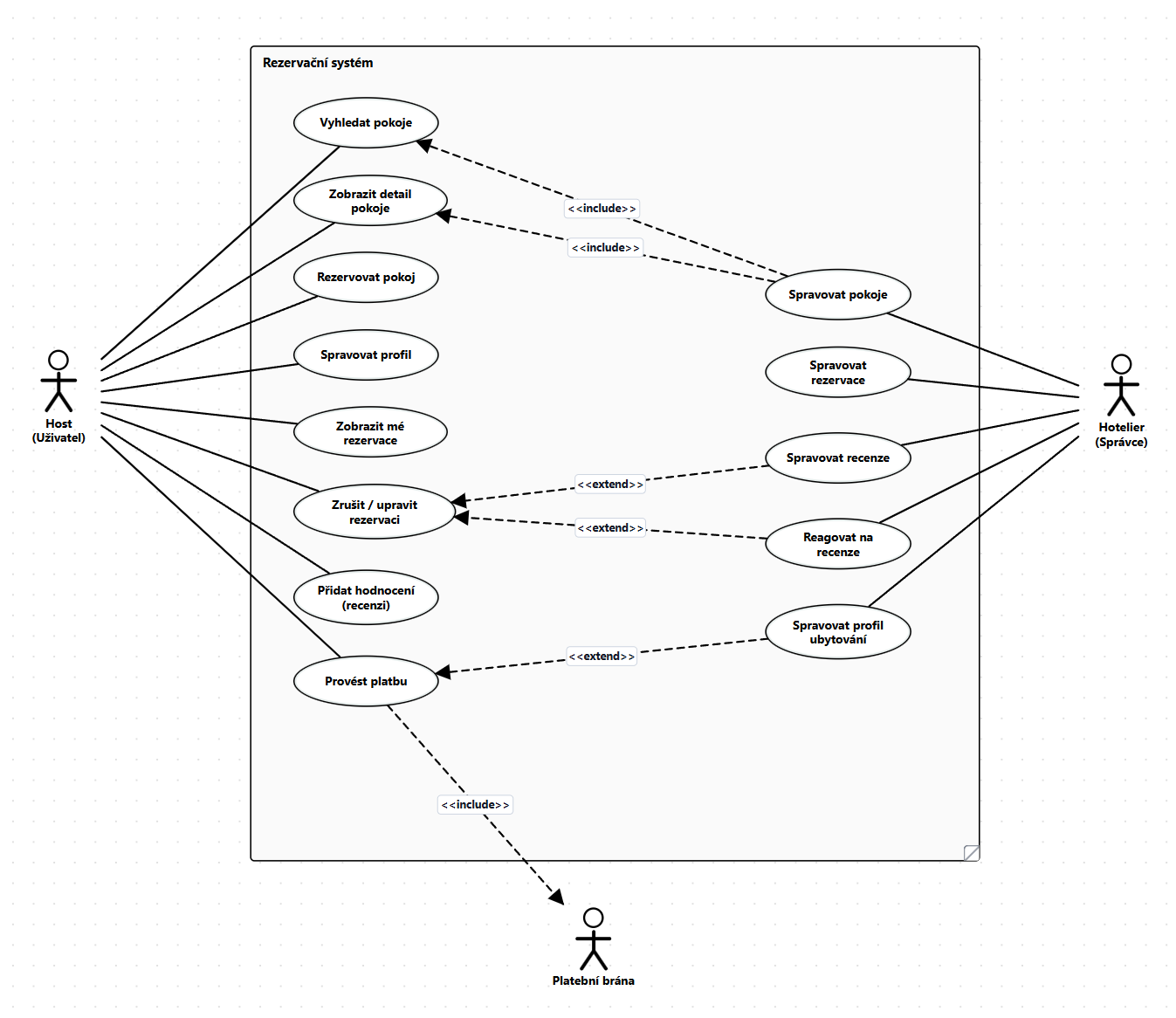
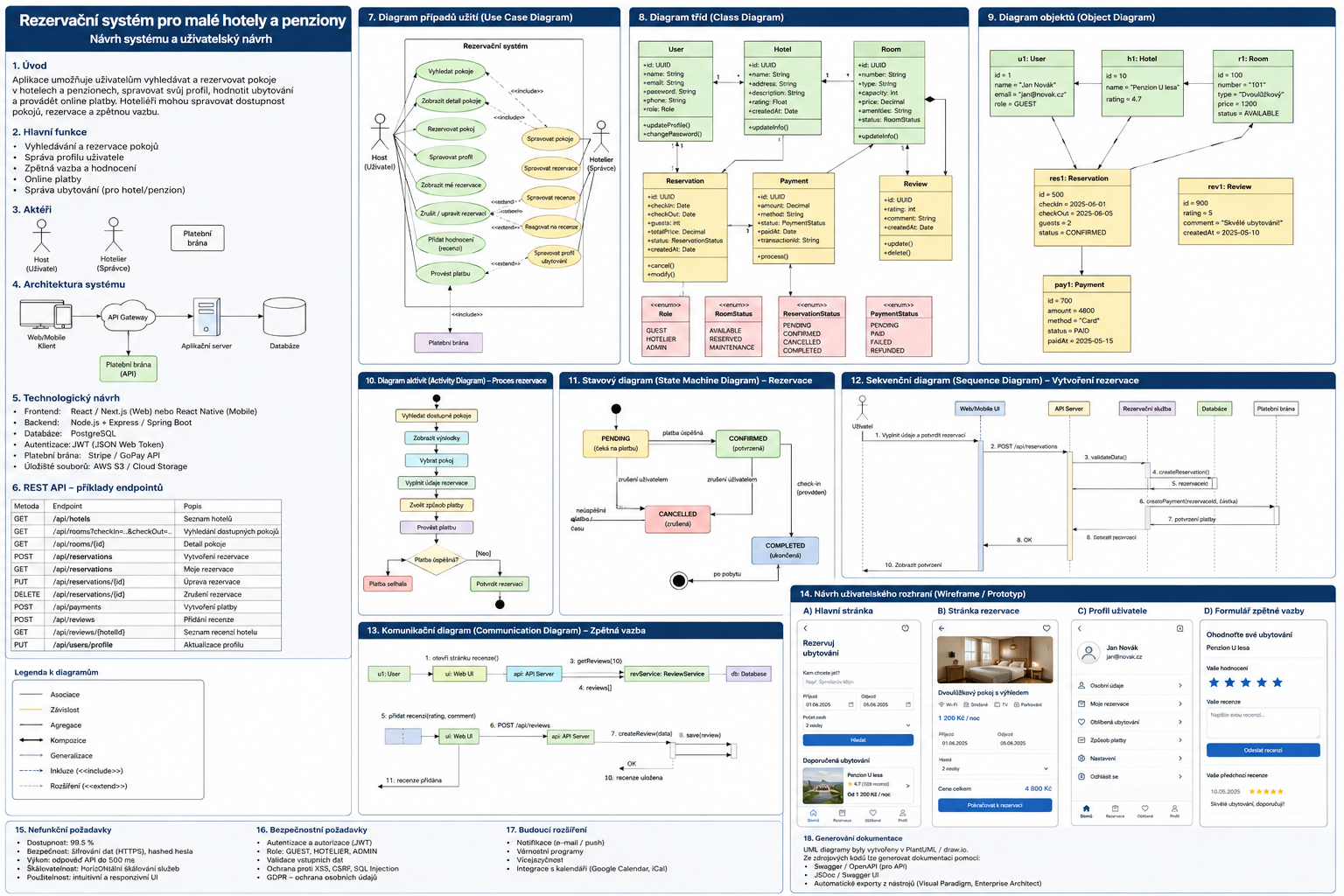
Ukázková úloha 2